
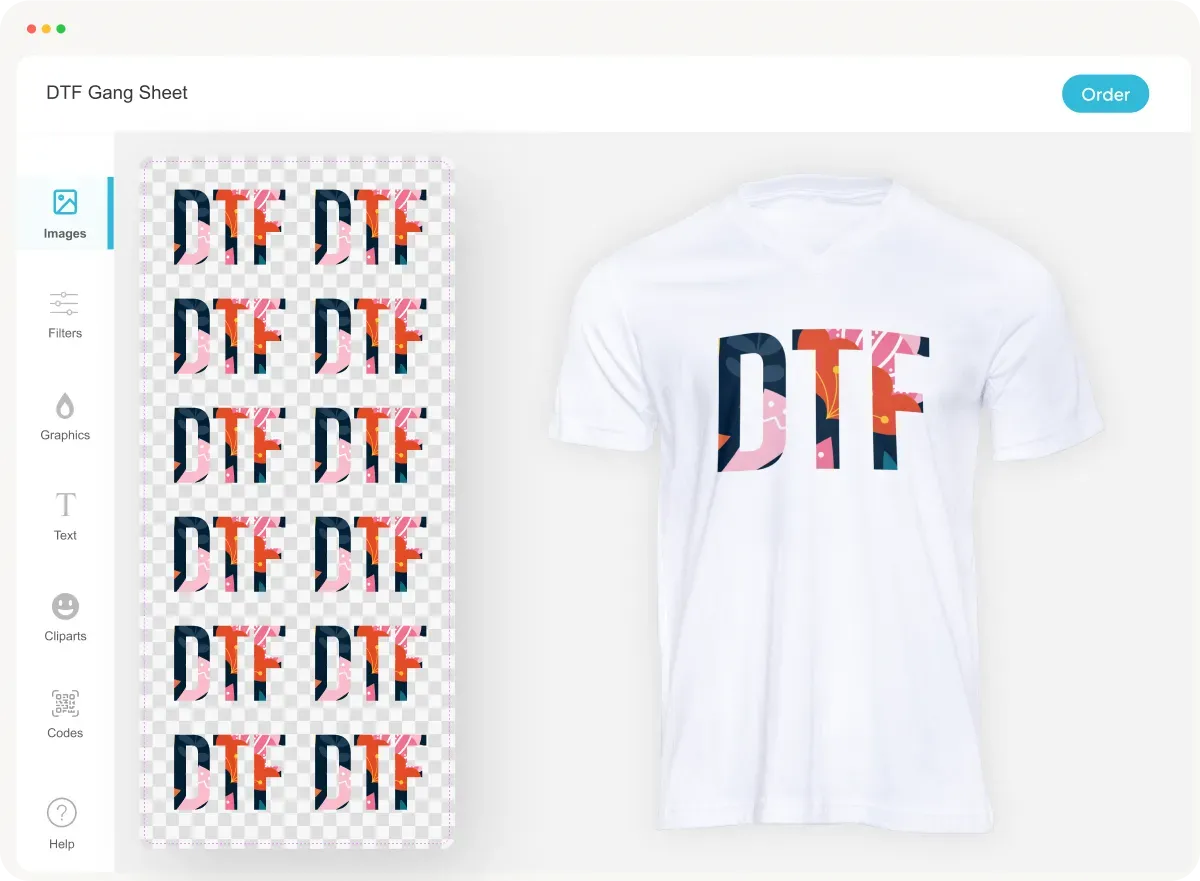
The DTF gangsheet builder is a groundbreaking tool that has transformed the landscape of custom apparel printing. This innovative software allows users to create efficient templates for Direct-to-Film (DTF) printing, enabling the incorporation of multiple designs in a single print run. By maximizing fabric utilization and minimizing waste, a DTF gangsheet builder not only streamlines the print optimization process but also enhances the quality of heat transfer printing. As businesses shift towards more sustainable practices, understanding how to effectively use a DTF gangsheet builder becomes essential for achieving both cost savings and high-quality outputs. Dive into the world of DTF printing and discover how these powerful tools can elevate your custom designs to new heights.
In the realm of custom clothing production, the use of a Direct-to-Film (DTF) gangsheet creator offers significant advantages, particularly in streamlining design layouts. This digital solution allows for multiple graphics to be printed simultaneously, resulting in efficient mass production for businesses that thrive on quick turnaround times. Utilizing a gangsheet design maximizes material consumption, thus reducing waste while enabling the vibrant reproductions that heat transfer printing is known for. For those engaged in custom apparel design, this innovative approach not only enhances productivity but also ensures the delivery of eye-catching designs that resonate with consumers. Embrace the efficiency of digital design tools and print optimization techniques to remain competitive in today’s marketplace.
The Fundamentals of DTF Printing
Direct-to-Film (DTF) printing stands at the forefront of modern custom apparel printing techniques. This process enables businesses to bring intricate designs to life with remarkable clarity and color vibrancy. The fundamental principle behind DTF printing is the application of ink directly onto a special film. Using heat and pressure, the print is then transferred onto fabric, allowing for a versatile range of textile applications. Furthermore, DTF printing is celebrated for its economical efficiency, reducing both waste and costs involved in the printing setup.
What sets DTF apart from other printing methods, like heat transfer printing, is its flexibility in design and the ability to handle various fabric types—from cotton to polyester blends. This versatility further enhances the appeal of DTF printing, making it an ideal choice for both small businesses and large-scale operations. As the industry grows, understanding core concepts like the DTF gangsheet becomes essential to harness the full potential of this innovative printing technology.
Leveraging DTF Gangsheet Design
A DTF gangsheet design is a clever way to consolidate multiple graphics into a single print run, making it highly advantageous for businesses managing bulk orders. By optimizing the layout of your artwork, you can minimize material used and reduce costs without compromising on quality. This strategic approach ensures that every square inch of film is utilized effectively, thereby maximizing your returns on investment in both materials and time.
Moreover, designing a gangsheet requires careful planning and execution. Users need to create a cohesive layout that maintains adequate spacing between each design, an essential consideration to avoid overlaps during printing. This meticulous attention to detail not only optimizes the print process but also improves the overall aesthetic quality of the finished products, making DTF gangsheet design a cornerstone of successful custom apparel printing.
Choosing the Right Software for DTF Printing
Selecting the right software is fundamental for utilizing a DTF gangsheet builder effectively. Programs like Adobe Illustrator and CorelDRAW are often preferred due to their robust capabilities in graphic design. These platforms provide users with the tools to create intricate layouts and manage color profiles, essential for achieving the vibrant prints that characterize successful DTF applications.
Additionally, there are specialized DTF software options available that streamline the gangsheet creation process. These dedicated programs typically offer user-friendly interfaces and features specifically designed for optimizing artwork for DTF printing. By choosing the right software, businesses can enhance their workflow, reduce the learning curve, and ultimately produce higher-quality prints with greater efficiency.
Essential Steps in DTF Print Preparation
Preparing for the DTF printing process includes several critical steps that directly influence the print quality. This begins with ensuring that the artwork files are in high resolution to preserve clarity and vibrancy. Formats such as AI or high-res JPEG are ideal; they allow for detailed reproduction of the designs once printed onto the film.
Once the design files are set, creating a properly sized template is essential. Users must set their templates according to the dimensions specified by their DTF printers while ensuring that sufficient spacing is maintained between each design. A meticulous preview of the gangsheet layout before printing plays a vital role in identifying potential issues, ensuring a smooth and successful printing process.
Maximizing Print Quality with Color Management
Effective color management is a crucial component in achieving the desired print quality in DTF printing. Utilizing specific ICC profiles tailored to both your printer and inks is essential to attain accurate color representation. This step guarantees that the prints produced are not only vibrant but also correctly match the intended design, particularly when dealing with complex color palettes.
Moreover, understanding color separation and its impact on print optimization can elevate the quality of your DTF prints. Proper color management techniques can help in preventing issues like color discrepancies and misalignments, ensuring that each design looks polished and professional regardless of the printing batch size. By prioritizing color management in your DTF gangsheet process, you set the stage for stunning final products that meet quality standards and customer expectations.
Post-Printing Techniques for Durability
After printing, several post-printing techniques are essential to ensure the longevity and durability of designs created using the DTF gangsheet builder. One key step is allowing the gangsheet to dry thoroughly before proceeding to the next stage to prevent smudging. This drying time can vary depending on environmental conditions but is crucial for maintaining print integrity.
Another vital step is the application of powder adhesion, which enhances the durability of the ink on the film. For optimal results, excess powder should be carefully shaken off before moving to the heat curing process. Proper heating ensures that the design adheres perfectly to fabrics, significantly extending its lifespan even after multiple washes. These post-printing care techniques are essential to delivering high-quality, lasting prints, greatly contributing to customer satisfaction.
Frequently Asked Questions
What is a DTF gangsheet builder and how does it improve custom apparel printing?
A DTF gangsheet builder is a specialized tool designed for Direct-to-Film (DTF) printing that allows users to compile multiple graphics into a single printing layout. This optimization helps reduce material waste, streamline the printing process, and enhance overall efficiency in custom apparel printing. Utilizing a gangsheet not only saves costs but also enables businesses to create intricate designs for bulk orders.
How do I select the right software for using a DTF gangsheet builder?
When choosing software for a DTF gangsheet builder, it's crucial to opt for programs that are compatible with DTF printers. Popular options like Adobe Illustrator and CorelDRAW offer extensive design features. Additionally, specialized DTF software can further streamline the gangsheet creation process, ensuring high-quality outputs suited for custom apparel printing.
What are the key steps in preparing a gangsheet design using a DTF gangsheet builder?
Key steps in preparing a gangsheet design with a DTF gangsheet builder include selecting the right software, creating a template that fits your printer's specifications, managing colors for optimal print fidelity, previewing the layout for errors, and saving the final design in a compatible format. Each of these steps ensures that your DTF printing results are precise and vibrant.
What should I consider for color management when using a DTF gangsheet builder?
For effective color management in DTF printing, utilize ICC profiles tailored to your specific DTF printer and inks. Accurate color representation is essential for achieving vibrant prints. By following recommended color settings, your DTF gangsheet builder can produce designs with striking clarity that meet your custom apparel printing expectations.
How can I ensure the durability of prints produced with a DTF gangsheet builder?
To ensure the durability of prints from a DTF gangsheet builder, follow post-printing care diligently. Allow the gangsheet to dry completely, apply a powder adhesion solution, and cure the prints with a heat press according to the material specifications. These steps enhance the longevity and washability of your custom apparel, securing quality results for your designs.
What are the advantages of using a DTF gangsheet builder for custom apparel printing?
Using a DTF gangsheet builder offers several advantages for custom apparel printing, including reduced waste, cost-effectiveness, and the ability to print multiple designs in one go. This method increases production efficiency and allows businesses to tackle bulk orders seamlessly, all while maintaining high-quality print standards essential for vibrant and detailed designs.
| Section | Key Points |
|---|---|
| Understanding DTF Gangsheet | Utilizes a digital layout to print multiple graphics simultaneously, maximizing material use and reducing waste. |
| Getting Started | Select appropriate software (e.g., Adobe Illustrator, CorelDRAW) that works with your DTF printer. |
| Design Sourcing | Collect high-resolution artwork files in compatible formats like AI, EPS, or JPEG. |
| Creating Your Design Layout | Create a template in your software and manage colors using specific ICC profiles for accurate representation. |
| Print Preparation | Preview your layout for alignment and save in formats like PNG or TIFF. |
| Printing Process | Configure printer settings accurately and monitor the printing for best results. |
| Post-Printing Care | Allow the gangsheet to dry, apply powder adhesion, and cure with a heat press. |
| Cutting and Application | Cut individual designs carefully and heat press them onto apparel. |
Summary
The DTF gangsheet builder stands out as a revolutionary tool in the realm of custom apparel printing. By implementing this innovative technology, businesses can enhance their production efficiency while maintaining exceptional print quality. This comprehensive guide outlines the essential steps to leverage the advantages of using a DTF gangsheet builder, from selecting the right software to post-printing care. Mastering these steps not only optimizes your workflow but also ensures vibrant, lasting prints that cater to diverse customer needs. Embracing the DTF gangsheet builder enables creators to push the boundaries of design and production, fueling business growth in today's competitive market.