
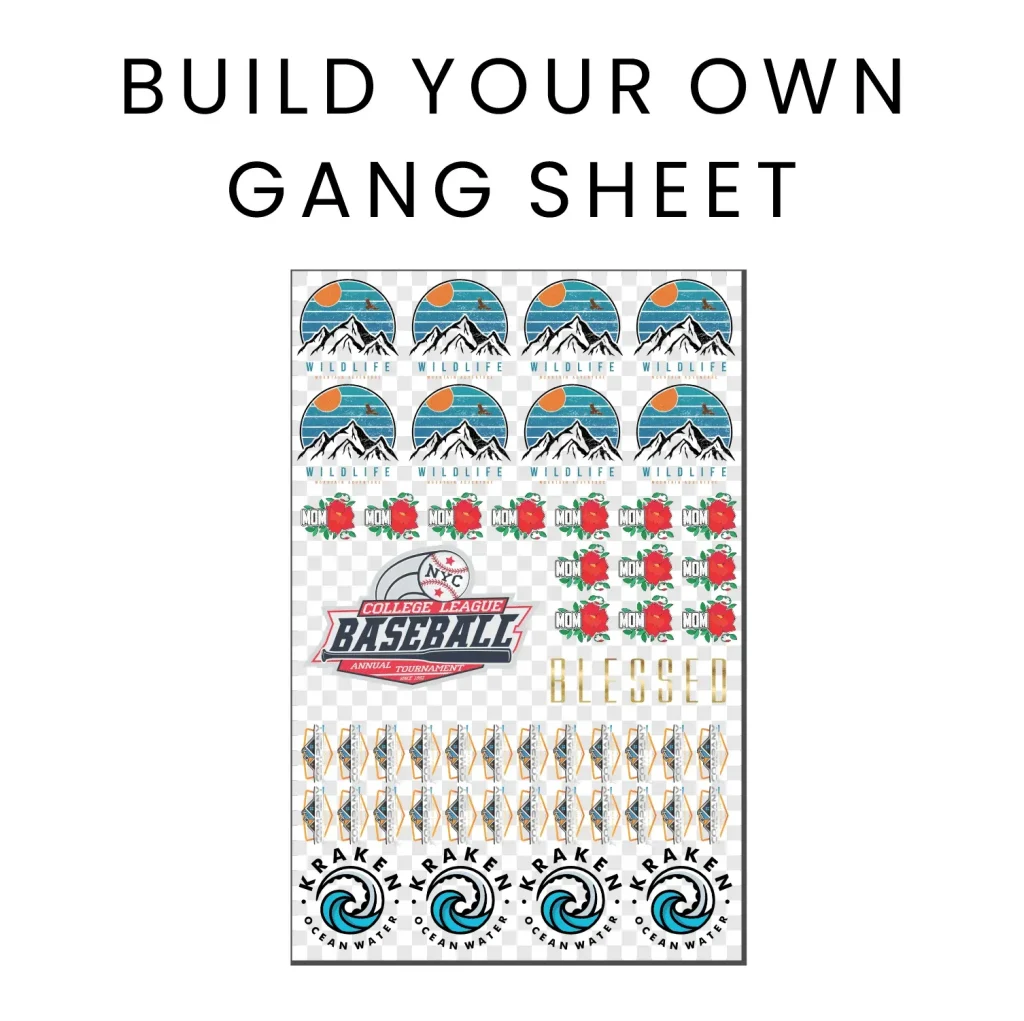
The DTF Gangsheet Builder is revolutionizing the digital printing landscape by optimizing print quality and efficiency. This innovative tool enhances the DTF printing process, enabling users to effortlessly arrange multiple designs on a single film sheet while maintaining stunning vibrancy and detail. To achieve the best results, understanding the critical DTF print settings is essential, from managing image resolutions to implementing gangsheet layout tips effectively. By following best practices for printing, including color accuracy and material selection, you can elevate your output and reduce waste significantly. Join us as we explore the art of maximizing your print quality with the DTF Gangsheet Builder, ensuring each transfer is both eye-catching and durable.
In the realm of digital fabrication, the Direct to Film (DTF) print system stands out for its ability to deliver high-quality outputs with rich colors and intricate designs. One of the essential components of this technology is the DTF Gangsheet Builder, which facilitates an efficient layout process for multiple graphics on a single print film. With a focus on best practices for optimal printing, such as image sharpness and proper ink selection, this article will provide insights into enhancing the overall performance of your printing setup. By mastering the techniques involved in DTF printing, you can not only amplify the aesthetic appeal of your projects but also streamline production for better results. Let’s delve into these advanced strategies and elevate your printing prowess.
The Essentials of DTF Printing
DTF printing, short for Direct to Film printing, has transformed the textile and apparel printing landscape. By using a unique film transfer method, it allows for vibrant and long-lasting designs that cater to diverse materials. The DTF print process starts with specialized inks that adhere well to the coated film, which is then transferred to a substrate through heat and pressure. This method not only enhances print durability and color vibrancy but also supports a wider range of fabric options compared to traditional printing methods.
Understanding the mechanics of DTF printing is essential for achieving exceptional print quality. The DTF Gangsheet Builder plays a critical role in this by maximizing the efficient use of the film space. This builder allows for better organization of multiple designs, helping you print more items in a single pass while minimizing ink waste. Mastering how to use this tool can lead to significant improvements in productivity and ultimately, profitability in your printing projects.
Image Resolution Guidelines for Optimal Results
One of the key factors in DTF printing is image resolution, which directly impacts the final print quality. It’s imperative to utilize images that are at least 300 DPI (dots per inch) for sharp and vibrant results. High-resolution images maintain their clarity and detail even when enlarged, allowing designs to pop out without pixelation or blurriness. Utilizing design software to verify and adjust image resolutions before creating gang sheets ensures that your final prints will be impressive and true to the original design.
In addition to resolution, consider the scene and subject of the image. Complex designs or those with intricate details may require a higher DPI, while simpler graphics could suffice with standard 300 DPI. It’s always better to err on the side of caution to ensure that intricate elements remain crisp and clear, particularly in competitive printing markets where quality sets you apart.
Setting Up Color Profiles Correctly
Color accuracy is pivotal in achieving the desired vibrant output for your prints. When working with graphic design software, always set your color profile to CMYK (Cyan, Magenta, Yellow, Black) which is definitively suited for printing applications. This adjustment allows designers to see a more accurate representation of how colors will appear when printed, reducing the risk of unexpected outcomes during the transfer process.
Avoid the common pitfall of designing in RGB (Red, Green, Blue) mode, as this can lead to significant color shifts during conversion to CMYK. Many software tools now provide color-approved palettes to guide artists and designers toward selections that will reproduce effectively on print. By adopting effective color management strategies from the beginning, such as calibrating your monitor and being mindful of your selected colors, you can enhance the overall quality of your DTF printing outputs.
Tips for Efficient Gangsheet Layout
Managing your gangsheet layout is crucial to both cost efficiency and print quality. To maximize the use of available space, arrange similar designs in proximity and consider their orientations. For instance, when printing multiple designs, it helps to group those that share color schemes or themes to limit excess material usage. The DTF Gangsheet Builder can simplify this process by facilitating an organized method to squeeze in multiple designs without compromising their quality.
Moreover, maintaining adequate margins and gaps between designs is essential. Tight margins may result in overlapping during the cutting process, leading to ruined prints. Aim for at least a quarter-inch gap between designs to allow for proper cutting and transfer. Such strategies not only enhance the precision of your cuts but also reduce material waste, ultimately saving costs and ensuring more pristine final products.
Choosing Quality Inks and Materials
The performance of your DTF prints is heavily reliant on the quality of inks and materials you choose. High-quality DTF inks are designed for optimum adhesion and vibrancy, producing prints that stand the test of time without fading or cracking. It’s advisable to select reputable inks specifically formulated for DTF applications to achieve the best results. Not only does this affect the quality of the print, but it also influences the durability and feel of the final product.
In addition to inks, the choice of films plays a significant role in the printing process. Ensure that you use compatible films that can withstand the heat required during the transfer process. Subpar films can lead to unsatisfactory results, such as peeling or fading. Investing in premium materials guarantees a strong bond between ink and substrate while delivering visually striking, long-lasting prints.
The Importance of Consistent Testing and Calibration
To achieve consistently high print quality, testing and calibrating your equipment is vital. Regular checks on your printer settings can prevent issues such as incorrect temperature or pressure during the printing process, which could lead to variances in output quality. Calibration involves fine-tuning your printer to ensure that every design is reproduced accurately every time, thus averting the risks associated with unsatisfactory or variable results.
Maintenance should also be a regular practice among printers. Performing routine checks and cleanings on your printer and heat press helps to avoid common printing issues, such as clogging or uneven transfers. A well-maintained machine not only extends the lifespan of your printing equipment but also guarantees that the quality standards you aim for are consistently met.
Frequently Asked Questions
What are the best practices for DTF printing using the DTF Gangsheet Builder?
To maximize print quality with the DTF Gangsheet Builder, ensure high-resolution images (at least 300 DPI), set your color mode to CMYK, and optimize your gangsheet layout by efficiently arranging designs with appropriate margins. Regular testing and maintenance of your printer and heat press are also crucial for achieving consistent results.
How does image resolution impact the quality of prints in DTF printing?
Image resolution is critical in DTF printing. Using images with a minimum of 300 DPI ensures clarity and vibrancy in the final prints. Higher resolution images maintain their quality even when scaled, preventing issues like pixelation that could detract from your design’s visual appeal.
What color settings should I use for the DTF Gangsheet Builder?
When using the DTF Gangsheet Builder, set your design software to CMYK color mode. This setting is optimal for printing and helps ensure that the colors you see on your screen closely match the printed output, avoiding discrepancies that can occur if designing in RGB.
What are effective gangsheet layout tips for DTF printing?
To create an effective gangsheet layout with the DTF Gangsheet Builder, arrange similar designs together and manage margins to prevent overlaps. Use ample space between designs for accurate cutting and transfer, which helps maximize material use while maintaining print quality.
What types of inks and materials should I select for DTF printing?
For optimal results in DTF printing, always choose high-quality DTF inks known for their vibrancy and durability. Similarly, select films that are compatible with your inks and can endure high transfer temperatures, as high-grade materials ensure long-lasting and eye-catching prints.
Why is testing and maintenance important in DTF printing with the Gangsheet Builder?
Testing and maintenance are vital for ensuring consistent print quality with the DTF Gangsheet Builder. Regular calibration of printer settings, along with routine maintenance of your heat press and printer, prevents common issues like ink clogging and uneven transfers, ultimately enhancing your printing results.
| Key Point | Explanation |
|---|---|
| Understanding DTF Printing | DTF printing transfers ink onto coated film for vibrant, detailed designs, optimizing film space with the DTF Gangsheet Builder. |
| Image Resolution Matters | Images should be at least 300 DPI to ensure clarity and vibrancy in prints. |
| Color Settings: Get Them Right | Use CMYK color mode from the start to avoid discrepancies in final prints. |
| Optimizing the Gangsheet Layout | Arrange designs efficiently, manage margins, and leave gaps between prints for better results. |
| Ink and Material Selection | Choose high-quality DTF inks and compatible films to enhance durability and vibrancy. |
| Test, Calibrate, and Maintain | Regular testing and calibration of printer settings are crucial for consistent print quality. |
| Continuous Learning and Community Engagement | Stay updated with the latest trends by joining online communities focused on DTF printing. |
Summary
DTF Gangsheet Builder is a pivotal tool for maximizing print quality in DTF printing. By adhering to best practices such as utilizing high-resolution images, setting the correct color modes, and efficiently arranging your prints on the gangsheet, you can achieve stunning results. Moreover, selecting quality materials and performing regular equipment maintenance will enhance the durability of your prints, ensuring they look vibrant and professional. Embrace continuous learning through community engagement and resources to stay at the forefront of this evolving technology. With these strategies, your DTF printing endeavors will consistently yield eye-catching results.